Building a Session MOTD for Claude Code
Why This Matters: Sustainability and Cost
Every AI request burns tokens — and tokens have both a financial cost and an environmental one. Data centers running large language models consume significant electricity and water for cooling. Wasting tokens isn’t just expensive; it’s an unnecessary environmental burden.
The most common source of silent waste isn’t bad prompts — it’s forgetting what settings you left on. The biggest quiet token drains are:
- Forgotten expensive model — starting a trivial task with Opus or Fable instead of Haiku because you forgot to switch back
- High effort left on — effort level
highorxhighmultiplies token usage for every request - Fast mode enabled — faster output means more parallel compute, higher cost
- Thinking always on — extended reasoning for simple tasks where it adds no value
- Unnecessary MCP servers active — each connected server injects thousands of tokens of tool definitions into every request, before you even type your first message
The fix isn’t complex tooling. It’s a two-second habit: glance at your settings before starting a new task.
This MOTD implementation makes that glance effortless. You see the current state automatically at session start, color-coded so expensive settings jump out immediately.
A lightweight way to display your current session configuration — model, effort, fast mode, thinking, and active MCP servers — every time a Claude Code session starts, and on demand via /motd.
What It Does
At session start (and whenever you type /motd), Claude Code shows a colored status block:
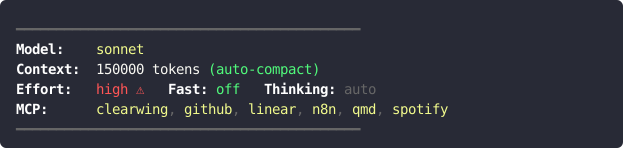
Color coding highlights expensive settings at a glance: - Red = Opus/Fable model, fast mode on, high effort - Yellow = Sonnet model, medium effort, MCP servers active - Green = Haiku model, low effort, fast off
Files to Create
| File | Purpose |
|---|---|
~/.claude/hooks/session-motd.sh |
Script that generates the colored MOTD |
~/.claude/commands/motd.md |
Slash command /motd |
1. Hook Script
~/.claude/hooks/session-motd.sh:
#!/usr/bin/env bash

SETTINGS="$HOME/.claude/settings.json"
get() { jq -r "$1 // empty" "$SETTINGS" 2>/dev/null; }

# Colors — must be actual ESC bytes, not literal \033
RED=$'\033[1;31m'
YLW=$'\033[1;33m'
GRN=$'\033[1;32m'
GRY=$'\033[0;90m'
BLD=$'\033[1m'
RST=$'\033[0m'

# ── MODEL ──────────────────────────────────────────────────────────────
MODEL_RAW=$(get '.model')
[ -z "$MODEL_RAW" ] && MODEL_RAW="sonnet"

case "$MODEL_RAW" in
    *opus*|*fable*)   MODEL_COL="${RED}${MODEL_RAW} ⚠ expensive${RST}" ;;
    *sonnet*)         MODEL_COL="${YLW}${MODEL_RAW}${RST}" ;;
    *haiku*)          MODEL_COL="${GRN}${MODEL_RAW}${RST}" ;;
    *)                MODEL_COL="${YLW}${MODEL_RAW}${RST}" ;;
esac

# ── CONTEXT WINDOW ────────────────────────────────────────────────────
COMPACT_WINDOW=$(get '.autoCompactWindow')
AUTO_COMPACT=$(get '.autoCompactEnabled')
if [ -n "$COMPACT_WINDOW" ]; then
    CTX_INFO="${COMPACT_WINDOW} tokens"
    [ "$AUTO_COMPACT" = "true" ] && CTX_INFO="${CTX_INFO} ${GRN}(auto-compact)${RST}"
else
    CTX_INFO="unknown"
fi

# ── EFFORT ────────────────────────────────────────────────────────────
EFFORT=$(get '.effortLevel')
[ -z "$EFFORT" ] && EFFORT="medium"
case "$EFFORT" in
    xhigh|high) EFFORT_COL="${RED}${EFFORT} ⚠${RST}" ;;
    medium)     EFFORT_COL="${YLW}${EFFORT}${RST}" ;;
    low)        EFFORT_COL="${GRN}${EFFORT}${RST}" ;;
    *)          EFFORT_COL="${YLW}${EFFORT}${RST}" ;;
esac

# ── FAST MODE ─────────────────────────────────────────────────────────
FAST=$(get '.fastMode')
if [ "$FAST" = "true" ]; then
    FAST_COL="${RED}ON ⚠${RST}"
else
    FAST_COL="${GRN}off${RST}"
fi

# ── THINKING ──────────────────────────────────────────────────────────
THINKING=$(get '.alwaysThinkingEnabled')
if [ "$THINKING" = "false" ]; then
    THINK_COL="${GRN}OFF${RST}"
elif [ "$THINKING" = "true" ]; then
    THINK_COL="${YLW}always ON${RST}"
else
    THINK_COL="${GRY}auto${RST}"
fi

# ── MCP SERVERS ───────────────────────────────────────────────────────
MCP_FILE=""
for f in "$HOME/.claude/mcp.json" "$HOME/.config/claude/claude_desktop_config.json"; do
    [ -f "$f" ] && { MCP_FILE="$f"; break; }
done

MCP_LINE="${GRY}none${RST}"
if [ -n "$MCP_FILE" ]; then
    ALL_SERVERS=$(jq -r '(.mcpServers // .mcp_servers // {}) | keys[]' "$MCP_FILE" 2>/dev/null)
    if [ -n "$ALL_SERVERS" ]; then
        DISABLED=$(get '.disabledMcpjsonServers[]?' 2>/dev/null | tr '\n' '|' | sed 's/|$//')
        ENABLE_ALL=$(get '.enableAllProjectMcpServers')

        PARTS=()
        while IFS= read -r srv; do
            [ -z "$srv" ] && continue
            if [ "$ENABLE_ALL" = "true" ]; then
                PARTS+=("${GRN}${srv}${RST}")
            elif [ -n "$DISABLED" ] && echo "$srv" | grep -qE "^(${DISABLED})$"; then
                PARTS+=("${GRY}${srv} (off)${RST}")
            else
                PARTS+=("${YLW}${srv}${RST}")
            fi
        done <<< "$ALL_SERVERS"

        MCP_LINE=$(printf '%s' "${PARTS[0]}")
        for ((i=1; i<${#PARTS[@]}; i++)); do
            MCP_LINE+="${GRY}, ${RST}${PARTS[$i]}"
        done
    fi
fi

# ── BUILD OUTPUT ──────────────────────────────────────────────────────
LINE="${GRY}━━━━━━━━━━━━━━━━━━━━━━━━━━━━━━━━━━━━━━━━━━━${RST}"
MSG="${LINE}
${BLD}Model:${RST}    ${MODEL_COL}
${BLD}Context:${RST}  ${CTX_INFO}
${BLD}Effort:${RST}   ${EFFORT_COL}   ${BLD}Fast:${RST} ${FAST_COL}   ${BLD}Thinking:${RST} ${THINK_COL}
${BLD}MCP:${RST}      ${MCP_LINE}
${LINE}"

jq -n --arg msg "$MSG" '{"systemMessage": $msg}'
Make the script executable:
chmod +x ~/.claude/hooks/session-motd.sh
Key implementation detail: ANSI color variables must use actual ESC bytes ($'\033[...'), not the literal string \033. Using the literal string produces garbled output in Claude Code’s terminal renderer.
2. Slash Command
~/.claude/commands/motd.md:
---
description: Show current session configuration (model, effort, fast, thinking, MCP)
---

<bash>bash ~/.claude/hooks/session-motd.sh | jq -r '.systemMessage'</bash>

Print the output of the command above verbatim, without truncation or modification.
It contains ANSI escape codes — pass them through exactly as-is.
The instruction to print verbatim is necessary. Without it Claude Code may summarize or strip the escape codes.
3. Wire It Into settings.json
Add the hook to ~/.claude/settings.json:
{
  "hooks": {
    "SessionStart": [
      {
        "hooks": [
          {
            "type": "command",
            "command": "bash ~/.claude/hooks/session-motd.sh"
          }
        ]
      }
    ]
  },
  "permissions": {
    "allow": [
      "Bash(bash ~/.claude/hooks/session-motd.sh *)",
      "Bash(jq -r .systemMessage)"
    ]
  }
}
The permissions.allow entries prevent Claude Code from prompting for approval every time /motd is run manually. Without them, the slash command triggers a permission dialog on each invocation.
How the SessionStart Hook Works
When Claude Code starts a session, it runs SessionStart hooks and expects each hook’s stdout to be a JSON object. If the object contains a systemMessage key, Claude Code injects that string as a system-level message shown to the user at the top of the session.
The script therefore ends with:
jq -n --arg msg "$MSG" '{"systemMessage": $msg}'
This is the only output format Claude Code accepts from a hook — a JSON object on stdout.
Settings Keys Read by the Script
All values come from ~/.claude/settings.json:
| Key | What it controls |
|---|---|
.model |
Active model name |
.autoCompactWindow |
Context window size in tokens |
.autoCompactEnabled |
Whether auto-compact is on |
.effortLevel |
low / medium / high / xhigh |
.fastMode |
Boolean, fast mode toggle |
.alwaysThinkingEnabled |
true / false / absent (auto) |
.disabledMcpjsonServers[] |
List of disabled MCP server names |
.enableAllProjectMcpServers |
Boolean, force-enable all MCP servers |
MCP server names are read from ~/.claude/mcp.json (or ~/.config/claude/claude_desktop_config.json as fallback), under the mcpServers or mcp_servers key.
Dependencies
jq— for readingsettings.jsonand producing the JSON outputbash4+ — for arrays (PARTS=()) and$'\033[..]'syntax
Both are available by default on most Linux systems.
Gotchas
Unicode box-drawing characters in code blocks can break rendering in some environments (e.g. DokuWiki). The ━ separator line works correctly in Claude Code’s terminal output.
$'\033[..]' vs '\033[..]' — the dollar-sign prefix is required. Without it, the variable contains the literal text \033[1;31m instead of the ESC byte sequence, and colors don’t render.
The slash command needs the verbatim instruction — Claude Code will otherwise interpret and reformat the ANSI output rather than passing it through.